




Most home service business owners would never ignore a failed code inspection. But many have no idea their website could have accessibility issues carrying their own set of legal and financial risks.
You know the ADA. Accessible entrances, compliant restrooms, proper signage. What many home service business owners have not considered is that the same law may apply to their website, with its own set of requirements and consequences for getting it wrong.
The stakes have changed. Attorneys now have access to tools that can help identify potential accessibility issues across large numbers of websites much faster than traditional manual reviews alone. Once a business receives a demand letter, the costs can add up quickly. According to accessibility advocacy organization Be Accessible, demand letters average around $5,000, out-of-court settlements average $30,000, court judgments average $85,000, and class action cases average $400,000. Defense costs can add tens of thousands of dollars on top of those amounts. Even when cases are resolved early, the expense is significant.
This is not a future problem. The law already exists, and enforcement is happening. What has changed is how quickly potential issues can be identified.
The Real Issue: ADA web compliance is not about installing an accessibility widget and assuming the job is done. It extends to the underlying structure of your site, including how images are labeled, how buttons are named, how forms are built, the colors you use, and the readability of your text. Many websites have accessibility gaps that business owners are unaware of.
Why Most Home Service Websites Are at Risk
Many home service websites are built on WordPress, and WordPress can absolutely support accessibility when implemented properly by an experienced developer. The challenge is what often happens in practice. A theme gets installed. A page builder is added. Plugins for forms, reviews, and maps are layered on top. Each component may come from a different developer, with different coding standards and potential compliance issues. Ultimately, the business owner is responsible for the finished product.
Updates add another layer of complexity. When WordPress, themes, or plugins change, accessibility improvements may need to be revisited. Maintaining compliance requires ongoing attention.
"It used to be 'if they catch me, they catch me.' Today, businesses can be identified much faster than they could have been a few years ago."
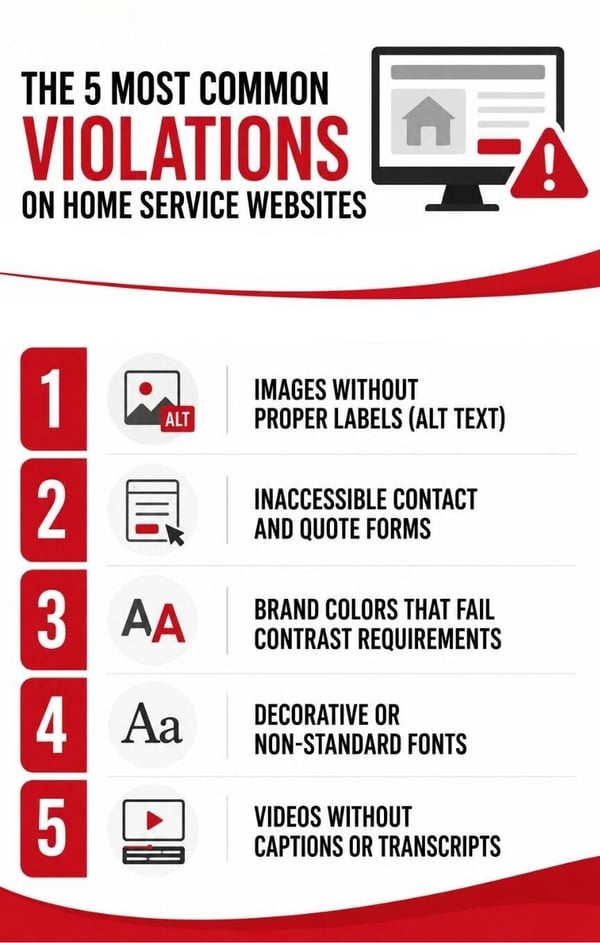
The 5 Most Common Violations on Home Service Websites
1. Images Without Proper Labels (Alt Text)
Images on your website should include written descriptions in the code, known as alt text, so screen readers can describe them to visually impaired users. A filename like "IMG_4823.jpg" is not sufficient. A description such as "newly installed metal roof on a two-story home in Phoenix" provides meaningful context.
2. Inaccessible Contact and Quote Forms
"Request a Quote" and "Schedule Service" forms should be navigable by keyboard and compatible with screen readers. If they are not properly coded, some users may be unable to complete them independently. Businesses should also evaluate forms embedded from field service management software because responsibility for the customer experience ultimately rests with the business.
3. Brand Colors That Fail Contrast Requirements
Accessibility standards include specific contrast ratio requirements for text and background combinations. Many professionally designed brand palettes do not automatically meet those standards online. Businesses using light blues, soft pinks, gray text on white, or similar combinations should have their designs evaluated.
4. Decorative or Non-Standard Fonts
Fonts that look great on wrapped vehicles or printed materials may be difficult to read online for users with visual impairments. Readability should be considered alongside aesthetics when selecting fonts for digital experiences.
5. Videos Without Captions or Transcripts
Testimonial videos, company overviews, and other promotional content hosted on your website should include accurate captions. If you embed videos from platforms like YouTube or Vimeo, caption settings should be reviewed at the hosting level.
Your Web Company Isn't Off the Hook for You
You are the party most likely to face the consequences of a non-compliant website.
If a website built several years ago is no longer aligned with current accessibility expectations, the liability generally falls on the business owner. Most web companies are not legal professionals. Their expertise often lies in design, development, and marketing. If accessibility requirements were never part of the original conversation, they may not have been addressed.
The same principle applies to your legal documents. Privacy policies, terms and conditions, and accessibility statements should not be copied from another website without review. Regulatory expectations evolve over time, and documents that were sufficient a few years ago may require updates today.
Review your legal documents. When did you last have your privacy policy and terms of service reviewed by an attorney? If you use AI tools in your business, even for tasks like drafting emails or creating content, discuss with legal counsel whether disclosure requirements apply to your situation.
ADA Compliance and Google: The Connection You Need to Understand
Screen readers and search engines rely on many of the same signals: clear structure, descriptive labels, logical navigation, and readable content. Improving accessibility can make your website easier for both people and technology to navigate and understand.
Addressing accessibility concerns may do more than reduce legal risk. It can also support the overall usability and discoverability of your website.
What You Should Do Right Now
You do not have to solve everything today, but you do need a plan.
1. Understand your current state. Ask your web provider whether an accessibility audit has been completed and what issues, if any, were identified.
2. Evaluate your branding online. Existing brands and newly refreshed ones alike should be reviewed for accessibility, including color contrast and font readability requirements.
3. Review your forms. Assess forms on your website, including those embedded from scheduling or field service platforms.
4. Audit your video content. Confirm that captions are enabled and accurate wherever you host video content.
5. Revisit your legal documentation. Determine when your privacy policy, terms of service, and accessibility statement were last reviewed by legal counsel.
The Bottom Line: Businesses that wait until they receive a demand letter often face more difficult decisions under tighter timelines. Businesses that proactively assess their digital presence put themselves in a stronger position to address issues before they escalate.
Technology continues to evolve, and legal expectations evolve alongside it. In many situations, identifying and addressing concerns early costs less than responding after a complaint has already been filed.
This article is for educational purposes only and does not constitute legal advice. ADA compliance requirements vary by situation. Please consult a qualified attorney for guidance specific to your business.
Guest Author
CI Web Group
At CI Web Group, Inc., our mission is to revolutionize the home services industry through innovative digital marketing and web design solutions. We are dedicated to helping home service businesses establish a powerful online presence, attract their target audience, and drive sustainable growth.
Our primary objective is to deliver exceptional results for our clients by leveraging cutting-edge technology, strategic thinking, and industry expertise. We aim to be the leading digital marketing and web design agency for the home services sector, known for our unwavering commitment to customer success and innovation.